Samsung UE55KS9000 review

OUR VERDICT

With the UE55KS9000 Samsung is aiming to get maximum impact from the high dynamic range (HDR) technology that's sweeping the TV world. Throw in UHD resolution, an improved smart system and gorgeous design, and the £2,099 price starts to look more than reasonable.

FOR

  • Truly spectacular HDR pictures
  • Stunning curved design
  • Much improved smart interface
  • Excellent SDR performance

AGAINST

  • No 3D support
  • Backlight striping with HDR
  • Curved screen is divisive
  • No 'Evolution Kit' support
Having caught its rivals with their guard HDR- and UHD-capab
le 'SUH
D' TVs, Samsung set out this year to make its mark by delivering a startlingly large range of TVs designed to unlock the full potential of the new era of high dynamic range video, with all its lovely extra colour and luminance benefits.
down last year with its
I'll get into the specifics of why Samsung reckons the UE55KS9000, is so well set up to deliver HDR's full beauty later, but first there's the striking matter of the TV's design to consider.
Like its bigger brother, the Samsung UE65KS9000, the UE55KS9000 really is a looker. Samsung has shifted from the relatively large, angular screen frames it introduced in 2015 to a much sleeker, more minimalist look for 2016, and it's a move I for one applaud; the new frame design is so incredibly thin it almost looks like the TV's pictures are being created out of thin air.
The design prowess even extends to the set's rear thanks to a smooth, rivet-free design, and a bold gleaming silver strip that stretches out from the point at the centre of the rear panel where the eye-catching silver stand is attached.
The UE55KS9000's connections bring us the first evidence of the set's bold AV ambitions. All of its four HDMIs (found on an external One Connect box) are built to the HDMI 2.0a specification, meaning they're capable of taking in HDR and UHD video at up to 60 frames a second.
The set also has three USBs for playing back video, photo and music files from USB drives, is really easy to connect to your smartphones and tablets, and carries both wired and integrated wireless network connectivity for streaming multimedia from networked DLNA-enabled devices or accessing Samsung's expansive online services and features.
Particularly important among these online services are the Amazon and Netflix streaming apps, as these further the UE55KS9000's picture ambitions by now supporting high dynamic range as well as UHD streams.
Samsung also has a strong track record of delivering the catch up apps for all the main UK broadcast services, and this support remains undiminished for 2016. It's slightly disappointing, though, that Samsung hasn't yet joined its big rivals in placing its broadcast catch-up services in an easy to use 'wrapper' like Freeview Play.
For all its design and smart TV prowess, the star attraction of the UE55KS9000 has to be its picture features. Samsung's going all out to make sure the set hits the Ultra HD Premium recommended specs set by the UHD Alliance.

High-expectation specs

In practice, that means the TV uses a 10-bit panel rather than an 8-bit one to ensure it handles the enhanced colour and luminance of HDR sources with suitable subtlety and dexterity. It's also the first LCD TV with an edge LED lighting system that's capable of hitting HDR-friendly peak brightness levels of 1000 nits.
At the other end of the light spectrum the UE55KS9000 is claimed to deliver black levels down to 0.05 nits, while its colour range is reckoned to cover 96% of the so-called DCI-P3 colour space used in digital cinemas - well in excess of the Ultra HD Premium 90% requirement. Samsung has achieved this by moving back to quantum dot colour technology after dabbling in 2015 with a proprietary 'Nano Crystal' system.
The TV can also support the SMPTE ST2084 EOTF (electrical optical transfer function - basically the way a screen converts digital data into light). Plus, of course, the UE55KS9000 carries a native 4K Ultra HD resolution of 3840x2160 pixels - something that's basically standard now on most mid-range and all high-end TVs.
With HDR proving consistently to have an even more explosive impact on picture quality than UHD resolution, the sort of specs the UE55KS9000 boasts raise hopes of some pretty mouth-watering next generation picture quality. Before finding out if delivers on this promise, though, I need to cover three features the UE55KS9000 does not have.
First, there's no 3D playback. Samsung has ditched 3D from all of its 2016 TVs, citing a lack of consumer interest and desire to focus on other TV technologies. This doesn't alter the fact, though, that there are 3D fans out there with extensive 3D Blu-ray collections who may not be very pleased at all that they won't be able to play those discs any more if they buy a UE55KS9000.
The UE55KS9000 also doesn't support the Dolby Vision take on HDR, which adds active metadata designed to optimise a source to the specific abilities of your TV. Even though Dolby Vision is not part of the Ultra HD Premium recommendations, having it available on the TV would've been icing on a very sweet cake.
Finally, unlike equivalent Samsung models from the past few years, the UE55KS9000 can't have its processing and features upgraded in future years by buying a Samsung 'Evolution Kit' or adding a new One Connect box.
The Gear Fit 2 is Samsung's best wearable yet

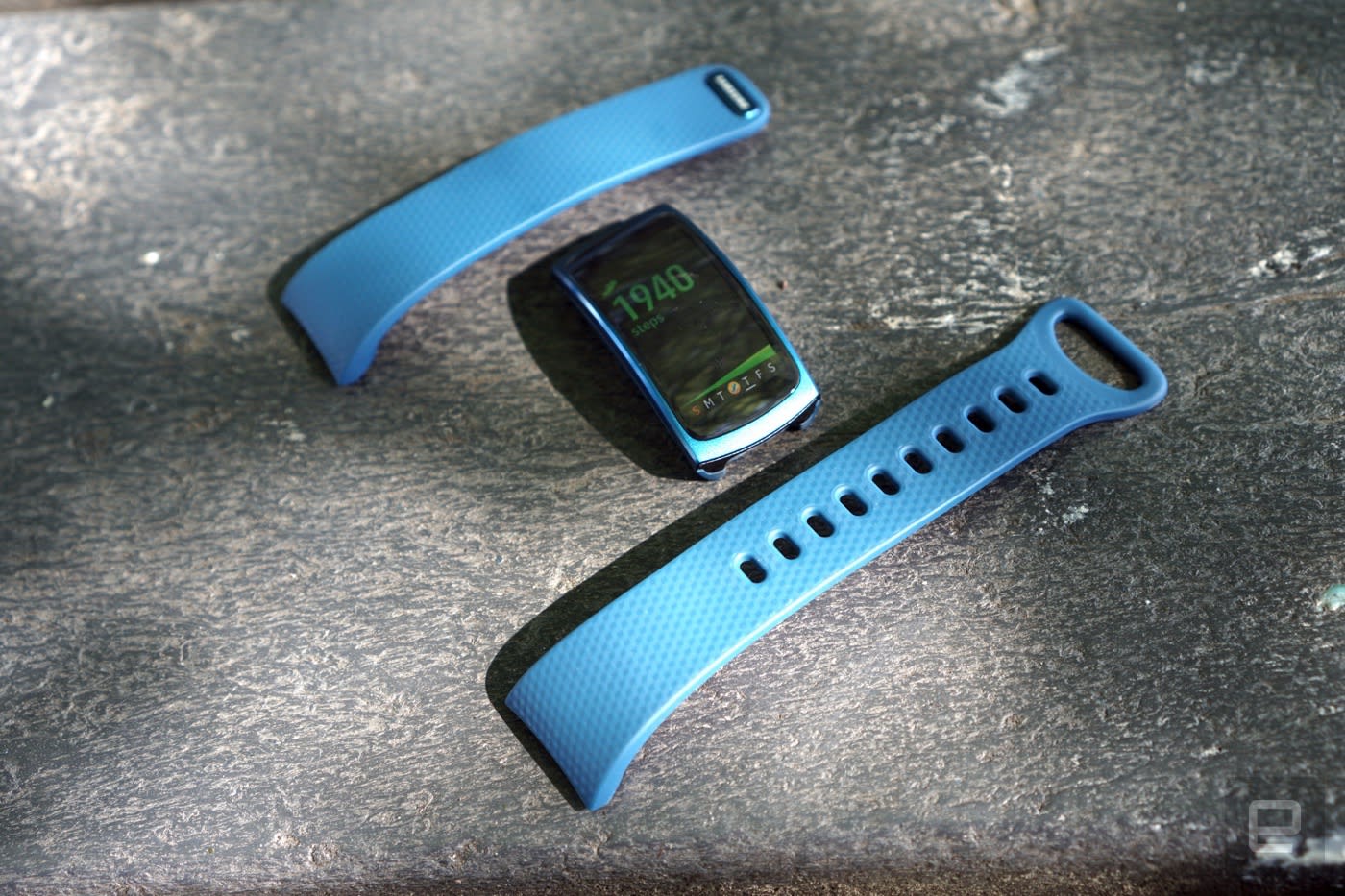
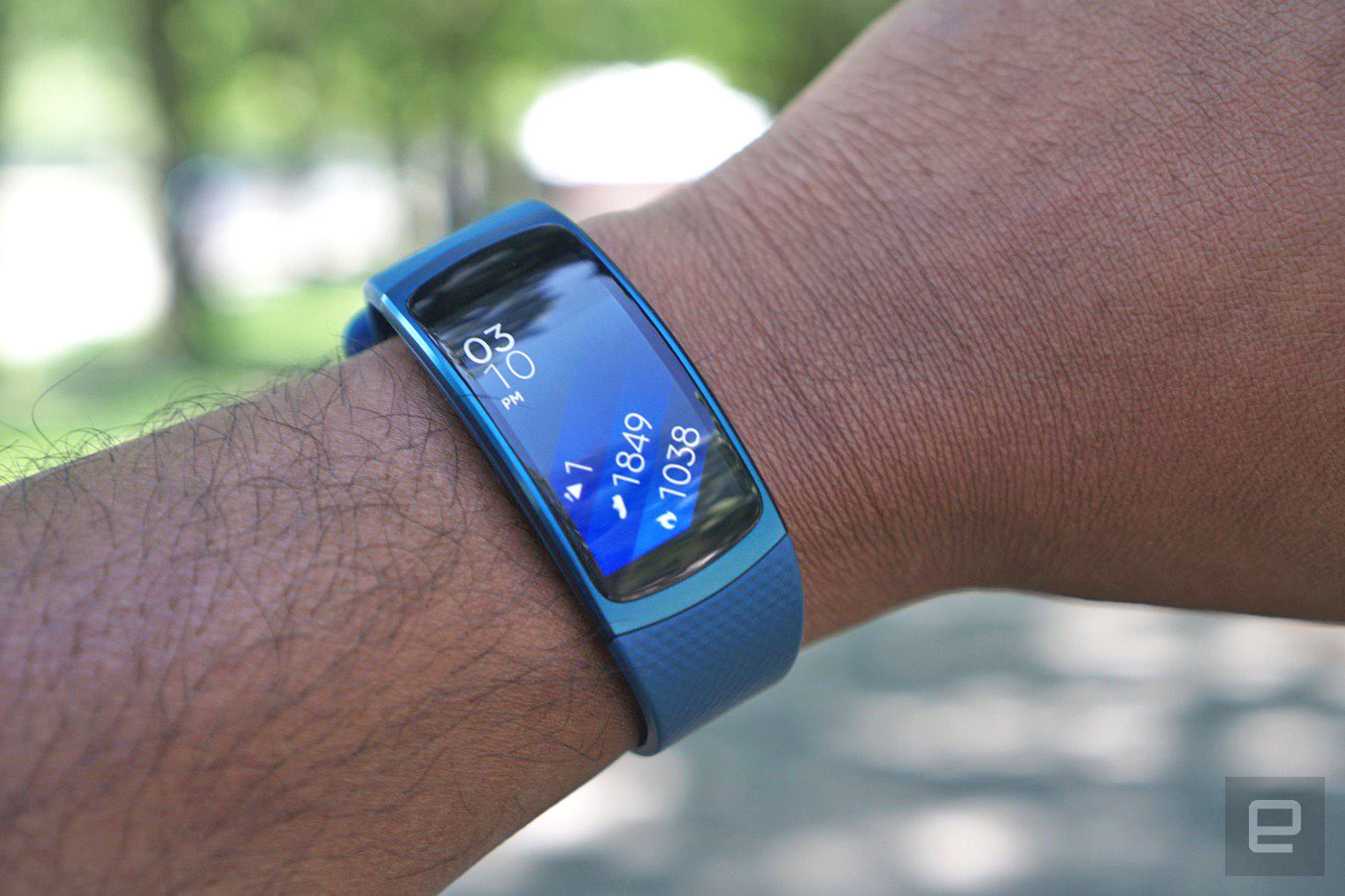
amsung has made plenty of wearables over the years, but few were as immediately impressive as the Gear Fit. Its curved screen and relatively slim design almost made us forget the company's early, clunky Gear smartwatches. Now with the $179 Gear Fit 2, Samsung has refined its original design to make it a lot more useful for athletes. It has built-in GPS, a slightly larger screen and smarter activity tracking. It's Samsung's best fitness wearable yet, but it's still a tough sell compared to competing devices from the likes of Fitbit.

Engadget Score
POOR
UNINSPIRING
GOOD
EXCELLENT
Key

Pros
  • Stylish and comfortable design
  • Accurate activity tracking
  • Built-in GPS and step tracking
  • Automatic workout logging
 
Cons
  • Android-only at the moment
  • Samsung's health apps aren't as robust as others

Summary

With the Gear Fit 2, Samsung has succeeded in making a capable and stylish fitness tracker. But it also doesn't do anything significantly better or differently than the competition.

Hardware

The Gear Fit 2 is an evolution of the original Fit's design in all of the right ways. Its 1.58-inch curved touchscreen display is now flush with the band so that it no longer sticks out awkwardly. It reminds me of Microsoft's Band 2, which also benefited from having a curved display sitting right alongside the wristband. The screen is also slightly wider now, which makes it more useful for actually reading information, and there's less of a bezel around the sides so it's almost like an edge-to-edge display.
Beyond that screen, the Gear Fit 2 looks restrained. The top half of the device is made from some fetching-looking metal while the bottom is more of a subdued plastic. There are only two buttons on the side of the device, which serve as home and power buttons. On the bottom there's a heart rate sensor and two small connectors for its charging stand. The relatively minimalist design is a stark cry from the overly complex wearables we used to see from Samsung.

Gallery: Samsung Gear Fit 2 | 8 Photos

For the wristband, it looks like Samsung is using the same plastic material from the last model, which remains flexible yet sturdy without feeling too stiff. You can disconnect the wristbands easily from the sides of the device, which will be useful if you ever feel the need for a new look down the line.
Under the hood, the Gear Fit 2 now runs a dual-core 1GHz Exynos 3250 processor and 512MB of RAM. (As someone who remembers being very excited when I got 512MB of RAM on a desktop, I find that latter stat hard to fathom.) Both of those specs are significant upgrades from the first Fit, which had a measly 160MHz processor and 8MB of RAM. It's no wonder we found the original to be underpowered. There's also GPS onboard the Fit 2, along with 4GB of storage for music and a barometer sensor for stair-tracking.

Software

Samsung is using its homegrown Tizen OS to power the Gear Fit 2, something it also uses in TVs and other wearables like the Galaxy Gear 2. And instead of being tied to Samsung's phones, the Fit 2 is now compatible with any Android phone running 4.4 or above. There's no word about iOS support yet, though. (Is it even worth the effort?)
Thanks to Tizen, the Fit 2 is much more capable than its predecessor. You've got multiple watch faces to choose from (and more can be downloaded through the Gear app), some of which will show fitness stats alongside the time. You can also customize the screens you see as you swipe through the Fit's interface. I have it set up to show the number calories I've burned, the number of steps and stairs I've taken, and my heart rate. Naturally, there's also a screen for quickly logging a workout.
The Fit 2 supports 15 different workout types, including common things like running and cycling, and more specific activities like yoga and pilates. It's now smart enough to automatically detect five different types of workouts, something competing health trackers from Fitbit and Jawbone have been able to do for years.
Thanks to its onboard storage (and vastly more functional OS), the Gear Fit 2 can also send locally stored music right to your wireless headphones. It can also control music stored on your phone, and it can tap into Spotify through your phone as well. Basically, if you prefer to run completely unencumbered, or with your phone, the Fit 2 has you covered.
To control the Gear Fit 2, you'll have to rely on Samsung's Gear app for Android. And to track your workouts, there's Samsung's S Health app. More on those in a moment.

In use

In day-to-day use, the Gear Fit 2 felt just as comfortable to wear as the Apple Watch Sport and Jawbone's Up24 (which are among my favorite wearables). It sits well on your wrist; most of the time you'll forget it's even there. I'd still like to see Samsung make it even thinner, so that it doesn't rise above your wrist as much, but the Fit 2 is nonetheless on par with competing wearables in terms of thickness.
I also had no problem putting it on -- and keeping it stable -- throughout the day. The Fit 2 has a simple clasp design that makes it easy to slip on while you're on the go. That's a good thing, because I've fought with plenty of wearables (especially from Fitbit) that are simply a chore to secure. And even though it's easy to wear, I also had no trouble with the Fit 2 falling off (which was a killer issue with the Jawbone Up3).
When it comes to tracking basic things like your steps and stairs climbed, the Gear Fit 2 seemed just as accurate as most other modern wearables. Its heart-rate tracking was also solid, delivering readings in line with what I've been seeing from the Apple Watch and recent Fitbit gear. But really, if you're buying this you're probably more interested in its GPS tracking, and in that regard it didn't disappoint. It accurately mapped several of my runs through Brooklyn's Prospect Park (I have a two-mile stretch that I cover regularly). It was also on par with RunKeeper's location tracking, which I normally use on my iPhone during workouts.
Setting up a manual workout takes a lot of swiping and menu pressing if you're moving between a variety of exercise types. But if you mainly do the same sort of workout, it's pretty easy to just get up and go. The Fit 2's touchscreen response is fast for such a small wearable, but even so, it's not something you'd want to deal with much in the middle of an intense session.
The Fit 2 also surprised me several times by accurately tracking how long I walked during my work commute. That's something other wearables have been doing for a while, but it's still a useful addition for Samsung fans. It's also the sort of thing wearables will have to get smarter about moving forward, so hopefully Samsung will be able to add automatic tracking support for more than just five workout types.
While you can view some basic post-workout details on the Gear Fit 2, you'll have to turn to Samsung's S Health app for a more detailed view. It's a fairly clean-looking app: The home screen highlights your most recent workouts, heart-rate readings and steps. Tapping into a workout lays out everything you've done that day, and you can also step backward to previous days pretty easily. Despite its minimalist look, I still had some trouble navigating around S Health. And it wasn't always obvious how to access more detailed information about workouts. But perhaps I've just been spoiled by better health apps from Fitbit and Jawbone.
As a smartwatch-like device, the Gear Fit 2 fares well. It can display notifications from your phone, and even though it has a tiny screen, there's enough room to read short text messages and tweets. It's not a screen where you'd ever want to read long emails, but that's true of dedicated smartwatches too. You can also have the Fit 2 open up apps on your phone from its notifications, which helped me quickly reply to Hangout messages and texts on several occasions.
Samsung claims the Gear Fit 2 gets around three to four days of battery life from its 200mAh battery. In my testing, which involved constantly wearing it throughout the day and doing a few runs, it usually lasted around two and a half days before needing a trip to the outlet. Speaking of recharging, I was pleased to find that Samsung moved towards a larger charging cradle for the Fit 2. That may sound paradoxical, but the original Fit's cradle was so small that I ended up losing it pretty quickly. This new version is better suited to staying in one place on your desk.

The competition

The Fitbit Surge.
Since it's a GPS-enabled fitness wearable, the Gear Fit 2 is best compared to the likes of the Fitbit Surge ($229) and the Microsoft Band 2 ($175). Aesthetically, it has a lot more in common with the Band 2, but if you can get past its looks, the Fitbit Surge is probably a better buy for fitness junkies. Fitbit has a much more robust fitness platform, as well as better integration with third-party services. As with all wearables, aesthetics play a big part in the purchasing decision, though, so it's understandable if you'd rather have a better-looking tracker instead of a more functional one.

Wrap-up

With the Gear Fit 2, Samsung has succeeded in making a capable and stylish fitness tracker. But it also doesn't do anything significantly better or differently than the competition. It feels like a fitness tracker meant for people who really want something to match their Samsung phones, rather than something every consumer would desire. It's ultimately unremarkable, but that's mainly because there are so many decent alternatives out there.

OnePlus 3 review: The best phone you can get for $399

OnePlus has been trying to craft a full-blown, "flagship killer" of a smartphone since day one, but how successful it's been is up for debate. From my perch, the company's first phone proved that a relatively unknown startup could build a high-caliber handset and a die-hard fanbase around it. Its second-generation device pushed it even further into the big leagues. And now there's the $399 (£309) OnePlus 3, which launches today.
Make no mistake: The competition is even fiercer than ever, but OnePlus is trying to meet the challenge. Best of all, that pain-in-the-ass invite systemis finally gone. Suffice to say, this year's launch is a big deal for OnePlus, and it's only fitting that the OnePlus 3 mostly represents this young company at its best. Indeed, right now you'd be hard-pressed to find any other phone this good for this price.

Engadget Score
POOR
UNINSPIRING
GOOD
EXCELLENT
Key

87
Pros
  • First-rate performance
  • Excellent build quality
  • Mostly stock Android, plus some neat features
  • Dual SIM support
  • It's $399!
 
Cons
  • Ships with a few minor bugs
  • Limited memory options
  • Dash charger doesn't work with all cables

Summary

OnePlus is back with its third-generation flagship phone, and it has more than enough horsepower to duke it out with devices twice its price. The phone's construction feels first-rate too, and OxygenOS -- the custom version of Android it runs -- could easily please stock aficionados and dedicated tweakers. It's not perfect, though: You only have one choice for storage (64GB) and the included super-fast charger sometimes isn't super-fast after all. Still, considering what the company is asking and how great everything else is, the OnePlus 3 represents the best balance of price and performance you can find.

Hardware

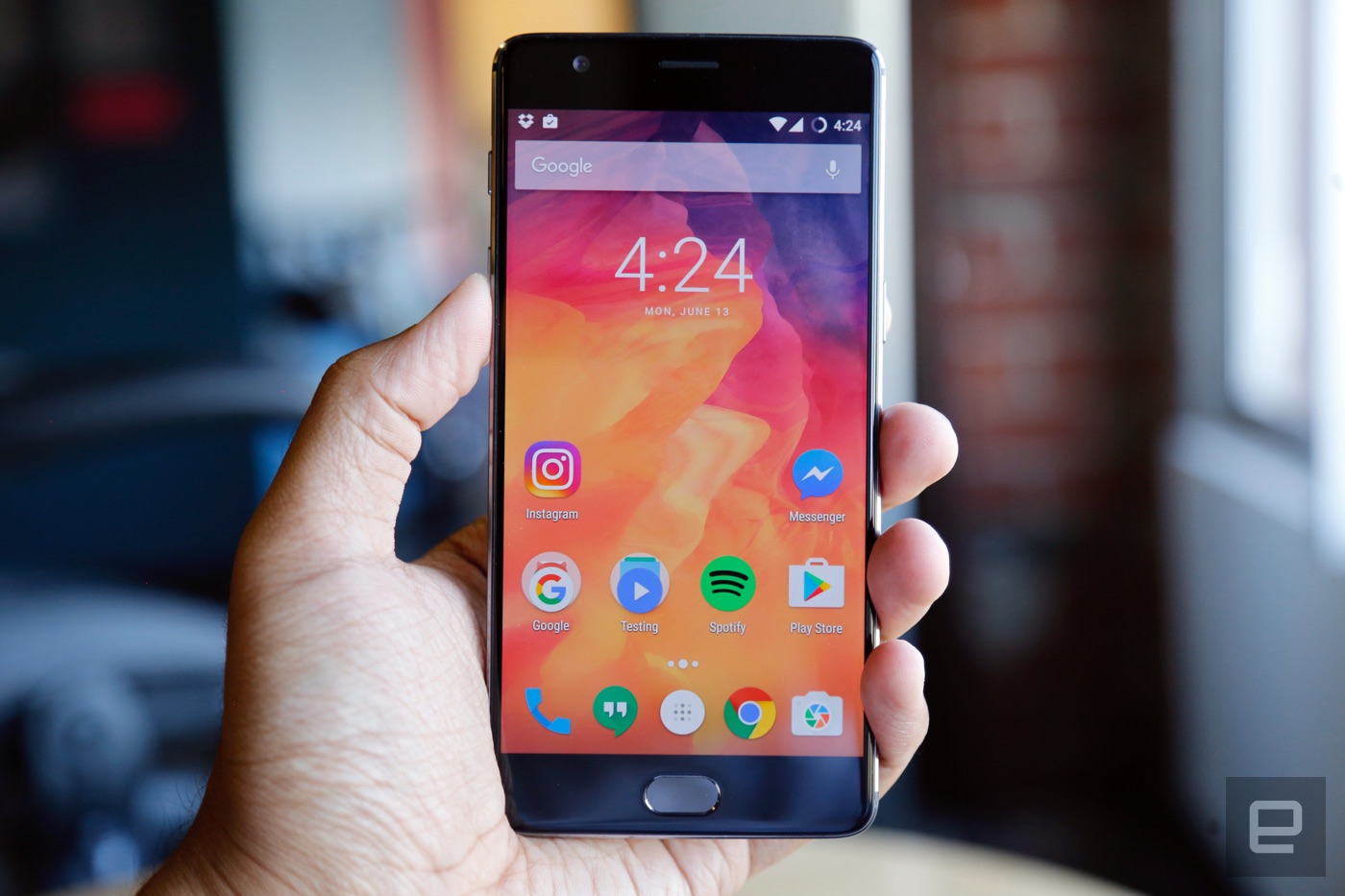
There's no denying that last year's OnePlus 2 was a well-constructed device, but it now looks like the days of sandstone polycarbonate are over. This year's version is milled from a single block of "space-grade" aluminum, and the 5.5-inch 1080p AMOLED display up front is swathed in a very slightly curved pane of Gorilla Glass 4. It's beautiful. More than that, its trim waistline -- 7.35 mm -- makes the OnePlus 3 feel sleeker and more elegant than you might expect from a phone with this big a screen. Think of it as a larger, much better OnePlus X and you're on the right track. Oh, and in case you were worried, you can still purchase a sandstone case or an authentic bamboo case for old time's sake; or you can go for the fancy black apricot version, rosewood version (both using real wood veneers) or Kevlar version.
The move might have been an obvious one -- OnePlus wanted a cohesive design across its devices -- but who cares? The result is a handsome, impeccably well-built smartphone. A few of my colleagues even mistook it for an HTC device, which I took as a compliment, considering how insanely devoted that Taiwanese company is to build quality. (Obviously, that statement is open to interpretation.) Anyway, yes, OnePlus has really upped its game this year. By the way, our review unit was attractive graphite gray, but a "soft gold" option will follow not long after launch. Seriously, does every company need to make a gold phone?

Gallery: OnePlus 3 review | 27 Photos

What's inside the OnePlus 3 is pretty impressive, too. Just about every flagship Android phone released this year packs one of Qualcomm's quad-core Snapdragon 820 chipsets and an Adreno 530 GPU. The OnePlus 3 does too, but there's a twist here: It also comes with 6GB of RAM. In fairness, the OnePlus 3 isn't the first smartphone we've seen that packs that much RAM -- that would be the ZTE Axon 7 -- but it's still nice to see a scrappy startup go somewhere most major manufacturers haven't.
Speaking of, the OnePlus 3 also accepts two nano-SIM cards for multiple lines of service. It's rare to see dual-SIM phones in the US, and the feature makes the OP3 a lovely travel companion, but that second SIM card takes up the space one might expect a microSD card to occupy. I'm not sure whether the team specifically gave up on expandable memory to accommodate another SIM; either way, you're stuck with 64GB of storage. I'm a bit of a digital pack rat, though, so having more storage options would've been nice. Oh, and the physical alert slider is back, making it easy to manage your notification sounds without mashing on the volume buttons. I loved that little thing when it debuted on the OnePlus 2, and I love it just as much this year.
The rest of the spec sheet is pretty typical of modern flagship phones. There's a USB Type-C port for charging and data transfer on the bottom, a 3,000mAh battery inside, a snappy and accurate fingerprint sensor that doubles as a home button and a pair of capacitive navigation buttons on either side of it. Above the screen sits an 8-megapixel camera for selfies, paired with a 16-megapixel main camera around the back. Oh, and unlike last year, the OnePlus 3 has an NFC radio for all those sweet, sweet Android Pay transactions.

Display and sound

I was half-hoping this was the year OnePlus would trick its flagship out with a Quad HD display, but that just wasn't meant to be. After all, building a phone like this for just $399 (£309) means trade-offs were inevitable. That doesn't mean the screen hasn't been improved. Rather than use an IPS LCD like it did last year, the company went with a 5.5-inch, 1080p Optic AMOLED display (the better to see VR content with a Loop headset, my dear). The switch leaves us with the same pixel density (401 ppi) and thus the same sharpness, but also punchier, more vivid colors. Blacks are especially deep, and whites are pretty crisp by default, but you have the option to make the display warmer or cooler depending on your preference.
Not enough? You can also turn on a proximity wake feature similar to what Motorola offers, where you can wave your hand over the screen to activate parts of it to display the time and notifications. Too bad it's not as accurate or as elegant as what Motorola has built; the feature works best with slow, deliberate waves, while a Moto X will wake up with even quick waves.
Alas, the OnePlus 3's single bottom-mounted speaker doesn't fare much better than the one we got last year. Audio is generally pretty clean, and you can crank up the volume surprisingly high, but things can get a little muddy if you do. The MaxxAudio equalizer we got with the OnePlus 2 is conspicuously absent, so you can't tweak audio levels right out of the box, but I can't imagine too many people used it in the first place.

Software

If you spent only a few minutes with a OnePlus phone, you'd be forgiven for thinking it ran a stock build of Android 6.0.1 Marshmallow. Well, not quite. The OnePlus 3 again runs OxygenOS, a modified version of Android I like to refer to as "stock plus"; there are plenty of additional features that don't cross the line into bloat. The overall effect is more subtle than other companies' approaches, and I think it's more valuable as a result.
The most obvious addition is the so-called Shelf, and you'll catch wind of it first because you're asked if you want it during initial setup. When you swipe right from your home screen, you're treated to the date, local weather, recently used apps and contacts you've been in touch with lately. There's a memo function too, for leaving yourself quick notes (with the option to create reminders from them), and the space serves as a neat place to add widgets without cluttering up your home screens. The Shelf first appeared on the OnePlus 2, and I've mostly ignored it since then, but some will certainly find it handy. Throw in some perfectly adequate Gallery and Music apps and you've got the most obvious additions to the usual Android formula.

Gallery: OxygenOS screenshots | 26 Photos

The fun stuff, however, can require a keener eye. There's an option to invert colors and enable a Night mode in the quick-settings tray; the latter is meant to reduce eyestrain and preserve the sanctity of your sleep cycle by giving the display an orangey cast. It's a good idea in theory, but the execution leaves much to be desired. You're supposed to be able to tweak how warm you want the Night mode display to be from the device's settings, but sometimes that doesn't work and the phone does whatever it wants. Bummer. By the way, if your eyes just don't like light colors, you can toggle a Dark mode that replaces Marshmallow's bone-white menu and app-launcher backgrounds with stark black.
Customization options go even further: You can modify Android's accent color, icons packs, the notification LED's color, what the home and capacitive buttons do when long-pressed and double-tapped. And if you don't like those capacitive buttons, you can turn them off completely and use on-screen buttons instead. Drawing gestures on the screen while it's off works the same this year; when the function is enabled, tracing a circle launches the camera, and doodling a V fires up the flashlight. I'll admit it: I totally forget about them at first, but it wasn't long before I was whipping the OnePlus 3 out of my pocket and launching the camera with a swipe of my thumb.
Ultimately, that's what I really dig about OxygenOS: if you want a more traditional, stock Android experience, it's there for the taking. But if you're a power user, or just want a little extra control over your phone, there's plenty of extra functionality waiting for you.

Camera

Smartphone makers agonize over their cameras, and with good reason -- chances are it's going to get plenty of use, and it's easy to let people down. OnePlus was limited by cost, so it went with a 16-megapixel sensor with an f/2.0 aperture lens from Sony, and you know what? It's perfectly adequate. Colors were bright and mostly well saturated (they occasionally came out a little weak), with a more than respectable amount of detail. You can get a little more nuance out of shots if you use an included HD mode, or output them as unprocessed RAW files.
I was concerned at first that the OnePlus 3 would fare worse than last year's model in low light because the size of the sensor's pixels has shrunk from 1.3 microns to 1.12 microns, but it's basically a wash. In the end, the OnePlus 3's main camera is a solid utility player; it's pretty good in every situation, but it certainly won't open your eyes the way other smartphone cameras can.

Gallery: OnePlus 3 camera samples | 23 Photos

In addition to having optical image stabilization, the OnePlus 3's camera also has phase-detection autofocus (like the OnePlus X), which makes locking on to subjects nearly instantaneous. It's too bad, though, that OnePlus did away with the laser autofocus module from the OnePlus 2 -- the cost of the 3's other components probably made the team cut it. The phone also ships with a manual mode that offers access to ISO, shutter speed, exposure and focus settings. Thankfully, shooting in full auto is just about always good enough.
The same can be said for the 8-megapixel front-facing camera, which consistently produced handsome selfies. Even better, there's an option for a smile detection mode that usually does a fine job detecting grins on your face and initiating a selfie countdown. It's not as good at noticing subdued, coy smiles, so just grin and bear it for a moment until the countdown begins.

Performance and battery life

As you'd expect from a phone with a first-rate list of specs, the OnePlus 3 just flies. My week of testing involved putting the phone through my usual workday routine, plus lots of extracurricular time playing Real Racing 3, Mortal Kombat X and Hearthstone. None of that stuff managed to faze the OnePlus 3 -- not even the sort of frenzied multitasking that only ever happens when I'm trying to break a phone.
Really, the best compliment I can pay the OnePlus 3 is that after a while, I stopped noticing how fast it was; everything just worked. It's still not the quickest-feeling phone I've used recently, though. That honor goes to HTC's 10 because of its super-low-latency touchscreen; it's so good, it feels like you're pushing the pixels around yourself. By comparison, there's just the faintest hint of latency when swiping around the OnePlus 3's interface, though I'm probably being a little picky here. After all, that's the sort of distinction that's apparent only if you've spent time playing with loads of new phones; few will take issue with what OnePlus brought to the table.
ONEPLUS 3HTC 10SAMSUNG GALAXY S7ONEPLUS 2
AndEBench Pro13,84116,67314,1689,945
Vellamo 3.05,2024,8764,2853,025
3DMark IS Unlimited30,05826,74728,52923,598
SunSpider 1.0.2 (ms)69960815471,516
GFXBench 3.0 1080p Manhattan Offscreen (fps)48484525
CF-Bench41,65349,89151,227N/A
SunSpider 1.0.2: Android devices tested in Chrome; lower scores are better.
Same goes for the battery, mostly. It's never fun to see a company use a smaller battery in the next iteration of its flagship device, but that's exactly what happened here: There's a 3,000mAh cell in the OnePlus 3, down from 3,300mAh in the OnePlus 2. Normally that'd be cause for much wailing and gnashing of teeth, at least in my house. Fortunately, the shift hasn't really changed much here. In our standard video rundown test (looping a video with the screen brightness set to 50 percent and WiFi connected), the OnePlus 3 stuck around for nine hours and 56 minutes, or about 50 minutes more than what its predecessor could muster. That's not much less than the HTC 10 and LG G5, but flagships like the Galaxy S7 siblings pack enormous batteries that last more than 13 hours in the same test.
Day-to-day use is a different story, though. The OnePlus 3 typically finished a 12-hour workday with about 25 percent charge left, and even if I forgot to charge it, I could usually count on it to see me through an early lunch the next day. On the occasions you'll need to charge the OnePlus 3 mid-slog, be sure to use the included Dash charger and cable -- the company says they can take the device from bone-dry to about 60 percent full within 30 minutes.
In fact, Dash is actually Oppo's VOOC tech rebranded. In this case, it uses a fast 4A current but with the regular 5V voltage, which keeps the device cooler than those based on other fast-charge technologies that use higher voltages; plus VOOC's charging speed remains the same when the device is being used, unlike others which require lowering the voltage then. The downside of this is you need to use the bundled 7-pin USB cable to make full use of the Dash charger. As I write this, I have the OP3 connected to its original charger with a Nextbit USB Type-C cable, and it's not charging even close to the advertised speed.

The competition

I've spent a decent chunk of this review comparing the OnePlus 3 with the HTC 10 and the Galaxy S7 siblings, but that's not terribly fair. While they all share the same flagship ambitions, don't forget that the OnePlus 3 only costs $399 (£309). That's both a huge selling point and a hindrance; the former doesn't need much explaining, but component and feature restrictions because of price mean the OP3's competitors can bring more to the table. Ultimately, here's how I'd break it down: If money is no object and you need a tremendous camera, get a Galaxy S7. If money still isn't an object and you're a sucker for great multimedia chops and build quality, get an HTC 10.
If you want an experience that gets awfully close to what those two devices can offer, and can live with a few trade-offs, the OnePlus 3 is a tantalizing choice for the price. The performance gap between these phones basically doesn't exist, which frankly is sort of crazy when you think about it. The lone, seemingly direct competitor to the OnePlus 3 is ZTE's Axon 7, with the same Snapdragon chipset paired with a Quad HD screen and 4GB of RAM for $449. That's not a bad premium to pay for a higher-res screen, but it's unclear whether the Pro version with 6GB of RAM will even make it to the States. Hopefully we'll get a chance to see how these two devices stack up soon.

Wrap-up

At the end of the day, no phone is perfect, and the OnePlus 3 doesn't try to be. What it does try to do is capture the essence of a flagship smartphone -- impeccable performance, smart software and top-notch build quality -- and squeeze it all into an affordable package. Guess what? The company succeeded. You can certainly do better if you're fine with spending more money, and there are better deals to be found if you're not a stickler for high-end performance. The careful balance OnePlus has struck here is impressive, though, and while the OnePlus 3 isn't for everyone, anyone looking for high quality without the corresponding price should start their search here.